

A multi-room speaker system lets you pipe high-fidelity audio into every corner of a building, all managed from one central interface. Whether you’re easing into the day with mellow tunes in the kitchen or setting the mood poolside, it makes synchronised sound effortless.
Why Multi Room Speaker Systems Stand Out
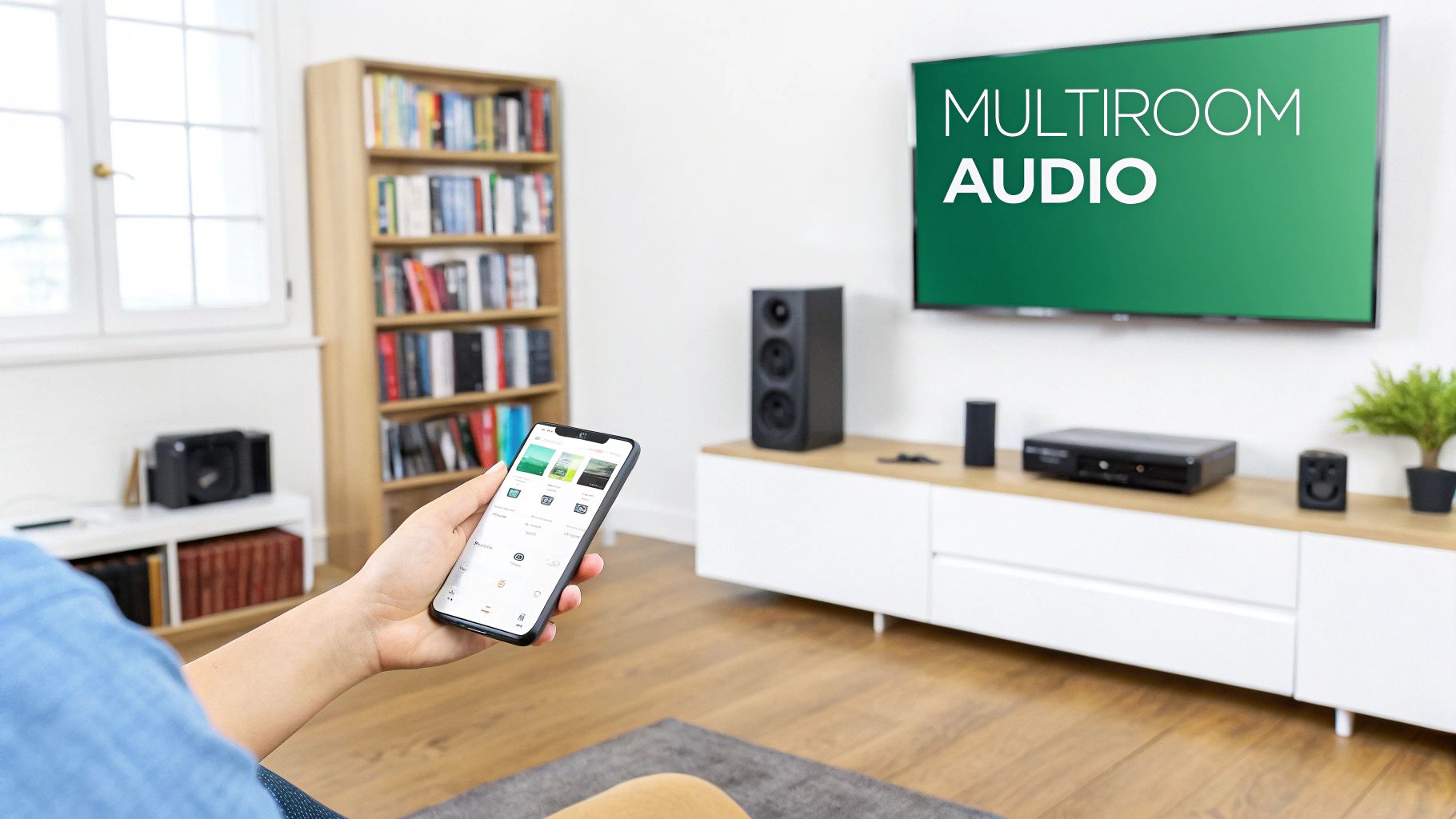
Imagine a sunny Saturday afternoon gathering beside the pool, where guests swipe through playlists on a wall panel to match the vibe.
Or picture an early-morning routine: news headlines in the kitchen, smooth jazz drifting through the living room.
- Seamless group listening across zones, creating one coherent soundstage
- Independent volume and source selection for each room’s mood
- Centralised control via smartphone apps, wall panels or voice assistants
| Market Driver | Installation Benefit | ROI Factor |
|---|---|---|
| Smart hubs and streaming integration | Faster commissioning and updates | Higher client satisfaction |
| Wireless protocols (Wi-Fi, Bluetooth) | Reduced cabling costs | Lower labour and materials spend |
Real World Scenario
On Saturday afternoon, a host taps the smart hub to link the outdoor patio and living-room speakers. The music syncs instantly, banishing echoes and keeping the beat tight from terrace to sofa.
- Smart-home hubs orchestrate group commands like a maestro
- Wi-Fi and Ethernet links deliver the bandwidth needed for lossless codecs
- Wireless mesh networks minimise dropouts across sprawling properties
Integrators also weigh latency budgets and network load when choosing between Dante/AoIP or traditional low-voltage runs.
Design Considerations
Think of streaming services and control hubs as the conductor and soloists in an audio ensemble.
- Streaming service choice shapes codec support and quality (high-res vs lossy)
- Wireless protocol selection impacts latency and network capacity
- Control interfaces dictate user experience and installation complexity
Smart installers note that UK home-audio spending helped push the speaker market to USD 1.17 billion in 2024, with multi-room and wireless systems fuelling much of that growth at a projected 3.4 % CAGR through 2034. Explore the full UK Speaker Market Growth Study.
This overview paves the way for detailed planning and site-survey steps in the next section. We’ll dig into zoning, cabling and power to ensure every room gets the perfect audio treatment.
Understanding Key Concepts
Picture a multi-room speaker system as if a single chandelier lit every room in a house. It glows steadily, filling each space without flicker or pause. That’s how one audio source can serve multiple zones seamlessly.
Audio zones are like distinct rooms on that plan. You can play the same track in the kitchen and dining area or choose different material in each. It all runs independently, so volume and source stay under precise control.
Imagine streaming jazz in the dining room while the kitchen streams podcasts. Meanwhile, the hallway echoes the living room’s playlist at a quieter level. By the end of this guide, terms such as zones, amplification paths and network switch roles should be as familiar as flipping a light switch.
Managing Latency
Latency is simply the gap between a source sending audio and the speaker playing it. Keep this delay low to maintain tight synchronisation across every zone. Let it creep up and you risk echoes or misaligned playback.
Key latency factors include:
- Network congestion that slows packet delivery
- Excess cable length in conventional two-wire runs
- Dante/AoIP systems using timestamps to achieve near-zero delay
Think of Dante or AoIP as a fleet of trains timed to precision. Each packet carries its timestamp so every “carriage” arrives exactly when it should. Compare that to constant-voltage wiring, which behaves more like a steady power line distributing uninterrupted current.
Control Protocols And User Interfaces
Most modern multi-room systems run on protocols like HTTP, MQTT or proprietary APIs. These let mobile apps and voice assistants act as the conductor. A tap on your phone or a spoken command sends instructions to every amplifier and speaker.
For more on powering network switches and speakers with PoE, see our detailed guide to PoE deployments: Power over Ethernet Guide
“Dante’s precision timing transforms audio into a coordinated fleet of trains arriving exactly on cue.”
— Audio Networking Specialist
Common control options include:
- Smartphone apps that group zones on the fly
- Wall-mounted panels with backlit buttons
- Voice assistants like Alexa or Google Assistant
Distribution Topologies
The choice of topology decides how audio reaches each speaker. Low-impedance systems drive current through pairs of wires with amplifiers at one end. Constant-voltage setups send a 100V line that steps down via transformers in the speakers.
Compare the options:
| Topology | Cable Type | Distance | Key Benefit |
|---|---|---|---|
| Dante/AoIP | CAT5e or higher | 100m+ | Flexible routing and granular control |
| 100V Constant-Voltage | Speaker cable | 500m | Simple long-run installations |
| Low-Impedance (8Ω-16Ω) | Speaker cable | 100m | High audio fidelity at close range |
Choosing the right topology is a balancing act between cost, distance and performance.
Amplification Paths And Network Roles
Amplification paths channel audio from server to speaker much like pumps boost water pressure through pipes. In AoIP setups, a managed network switch steps in as station master, routing each stream to its correct “platform”.
Critical switch roles include:
- Multicast Routing to distribute one stream to multiple endpoints without wasting bandwidth
- Quality of Service (QoS) to ensure audio packets get top priority
- VLAN Segmentation to keep audio traffic isolated from other network data
A well-configured switch ensures every zone stays in perfect sync, avoiding dropouts or interference.
On the front end, mobile apps often display a floorplan view. Clients tap areas to assign sources or tweak volume. Voice commands can launch scenes such as party mode or relax mode at a word.
These concepts tie directly back into your site survey and rack design. Position your amplifiers and switches based on the signal paths you’ve mapped out.
Now that you’ve charted signal journeys and switch duties, you’re ready to compare topologies against real-world projects and dive into detailed case studies.
Comparing Speaker System Topologies
Picking the right audio topology comes down to venue size, budget and the level of sonic performance you need. We’ll walk through three familiar environments—a café, a townhouse and a boutique hotel—to show when 100 V constant-voltage, low-impedance and Dante/AoIP setups shine.
Think of cable runs as city streets, transformers as traffic junctions and network bandwidth as the main thoroughfare for your audio. Armed with our decision framework, you’ll zero in on the optimal topology for every project.
Here’s a decision tree that visualises the key distribution choices across topologies:
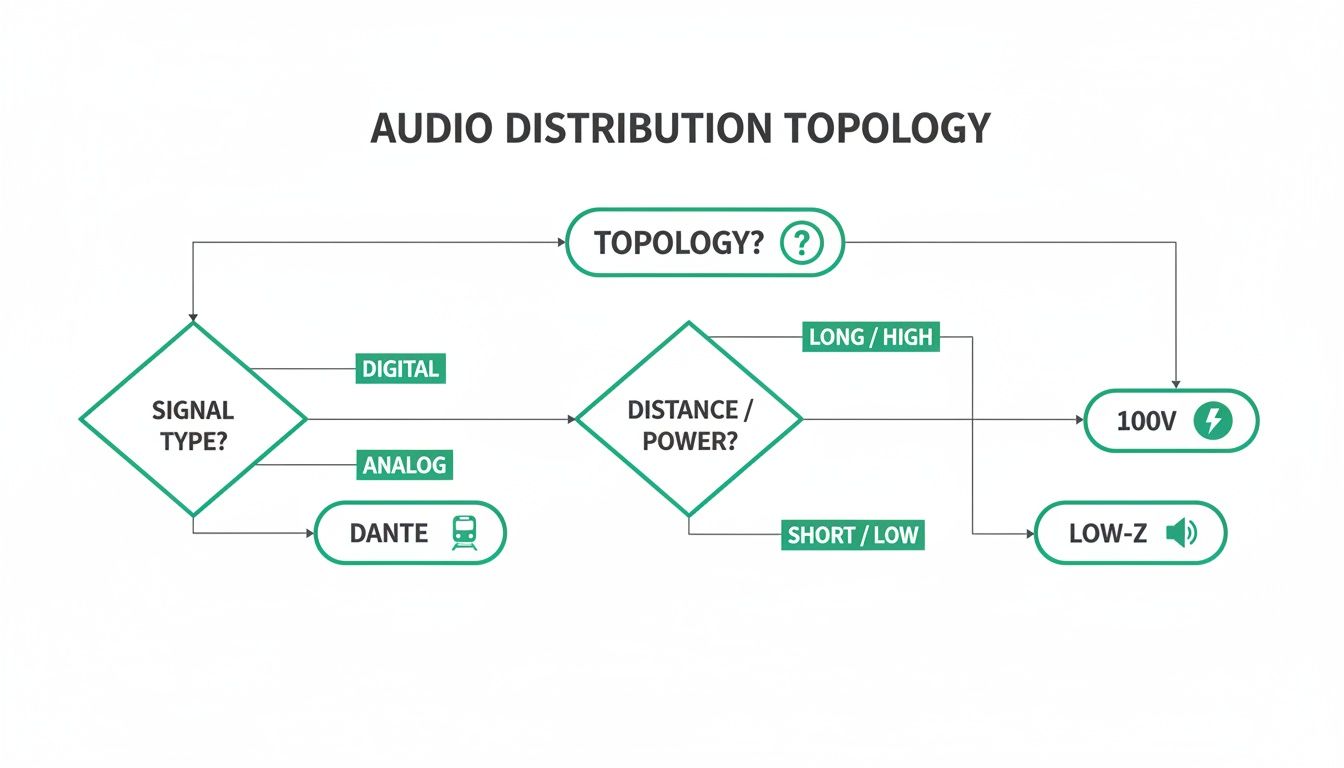
This graphic lays out the path for choosing between Dante/AoIP, 100 V and low-impedance based on distance, budget and system complexity. You’ll quickly see how basic two-wire runs meet small-venue needs, while managed networks scale to larger properties.
Café Case Study
In a cosy café, simplicity and cost control rule. A 100 V constant-voltage system uses just two-wire speaker cable—good for up to 500 m—and inline transformers on each speaker.
Key benefits:
- Minimal labour with a straightforward installer workflow
- Consistent volume across multiple zones
- Fewer amplifiers and a more compact rack footprint
This lean setup delivers reliable background music throughout service hours without a complicated rack of gear.
Townhouse Case Study
When a homeowner demands pristine audio in a dozen rooms, low-impedance (8 Ω–16 Ω) is hard to beat. Short runs—typically under 100 m—preserve every nuance of the source material.
Highlights of this approach:
- Dedicated amplifier per zone for maximum clarity
- Short “street-like” cable pathways to keep losses minimal
- Transformer-free design for flat frequency response
It’s the go-to for audiophile-grade listening rooms and immersive home cinema experiences.
Boutique Hotel Case Study
Large venues with dozens of zones call for granular control. A Dante/AoIP network rings every endpoint using CAT5e (or better), easily covering 100 m+ per link.
Primary advantages:
- Centralised management of hundreds of endpoints
- Near-zero latency multicast keeps all zones in sync
- Scalability through off-the-shelf network switches
Adding managed switches with QoS guarantees that audio traffic sails through without interruption.
Comparison Of Multizone Topologies
To make sense of these options, here’s a side-by-side look at how each topology stacks up across key metrics:
| Topology | Use Case | Cable Type | Max Distance | Key Benefit |
|---|---|---|---|---|
| 100 V Constant-Voltage | Café, Retail | Speaker cable | 500 m | Cost-effective long runs |
| Low-Impedance (8 Ω–16 Ω) | Townhouse, Home | Speaker cable | 100 m | High-fidelity audio at short range |
| Dante/AoIP | Boutique Hotel | CAT5e or higher | 100 m+ | Scalable, low-latency network control |
Each approach balances distance, audio quality and control complexity—choose the one that aligns with your site survey and client objectives.
Decision Framework
Follow this sequence to lock in the right topology:
- Assess venue size, layout and budget caps up front
- Clarify audio fidelity targets and zoning requirements
- Map out cable pathways and network infrastructure options
- Align your topology choice with distance, complexity and control needs
This step-by-step framework removes guesswork and keeps everyone on the same page.
Best Practices
- Always leave spare cable runs in walls or ceilings for future expansions
- Label every cable and switch port during installation
- Use test tones and level checks at each zone before handover
Apply these guidelines, and you’ll deliver a rock-solid, easy-to-manage multizone audio installation every time.
Planning Site Surveys And Zoning

Transforming a blank floor plan into an immersive audio experience starts on site. Walk each room as if you’re piecing together clues, noting every acoustic quirk and structural detail.
Every reflective surface, ambient noise source and service riser you log at this stage feeds into a design that brings even, crisp sound to every corner.
Conducting A Sound Survey
First, gather a sound level metre, a reliable smartphone measurement app and a printed floor plan with a clear scale.
Take readings at both busy and quiet periods to map noise extremes. Record ambient levels in dB at multiple points around each space.
Next, identify HVAC vents, nearby roads or machinery as key noise sources. Sketch their positions and note typical frequency ranges to guide any acoustic treatment.
- Calibrate metres daily for consistent accuracy
- Capture data at ear height and near the ceiling
- Photograph each measurement location for quick reference
Map Cable Pathways And Power Points
Early mapping of cable routes avoids frantic conduit hunts once walls are sealed. Use different colours on your plan for audio, power and network runs.
Confirm socket locations and circuit load capacities. Ensure the electrical supply can handle amplifier inrush currents without tripping breakers.
Inspect ceiling voids and wall cavities for obstructions. Note insulation, fire breaks and structural beams to prevent surprises later.
Numbered Routing Checklist:
- Mark power and network outlets
- Trace each speaker run, measuring estimated distance
- Label patches for amplifiers, switches and zone controllers
- Reserve spare conduits for future expansions
- Validate pathway bends against cable specifications
Create Zones And Position Speakers
Divide the building into zones based on function and occupancy. This lets you run independent audio sources or synchronise sound where it makes sense.
Sketch a simple zone map on your floor plan. Don’t forget buffer zones in corridors to avoid abrupt volume changes between rooms.
Plan for 10–15% speaker overlap so coverage meshes seamlessly. Angle speakers towards listening areas, steering clear of harsh, reflective surfaces.
| Zone Type | Speaker Type | Overlap Percentage | Acoustic Notes |
|---|---|---|---|
| Conference Room | Ceiling 6 W Speakers | 15% | Prioritises voice clarity |
| Retail Area | Surface-Mount Columns | 10% | Ensures consistent background music |
| Breakout Space | Flush-Mount 4″ Units | 12% | Balances speech and music |
“Proper zoning turns a multi room speaker system into a unified sound stage across any environment.”
— Epic Audio Consultant
Coordinate With Architects For Concealment
Share cable diagrams and speaker cutout templates with architects early in the design phase. This collaboration ensures wiring is hidden neatly in walls or ceilings.
Agree on conduit sizes and bend angles in the architectural drawings. Prevent the need for surface trunking by planning routes before plastering.
Coordination Best Practices:
- Supply DWG files with consistent layer naming conventions
- Schedule joint walk-throughs after plaster but before finishes
- Label equipment positions using clear reference codes
Use A Printable Survey Form
A consistent survey form guarantees every measurement and decision point is captured. You can use our free printable PDF template or adapt it to your needs.
Your form should prompt for room ID, dimensions, ambient noise levels and intended audio application. Include sections for speaker model, cut-out size and cable type.
Practical Tips For Survey Forms:
- Use tick boxes for common speaker types
- Leave space for photos or quick sketches
- Include a client sign-off field
Completing this form before kit ordering saves revision time and ensures everyone works from the same set of facts.
Review And Hand Over Plans
Finally, review all survey notes with the client and installation team. Confirm room IDs, zones and cable pathways one last time.
Update your equipment lists and bill of materials based on the final survey data. That way, installation day unfolds exactly as you’ve planned—no detours, no surprises.
Selecting Speakers, Amplifiers And Control Options
Matching form and function is key when you’re specifying hardware for each audio zone. From sleek in-ceiling speakers to bold surface-mount columns, aesthetic choices will shape your acoustic footprint.
Installers often juggle a client’s style vision with specs like frequency response, dispersion angles and mounting constraints. In this guide, we’ll navigate speaker form factors, amplifier topologies and control options step by step.
- Ceiling-Mounted Speakers: Flush-fit units that preserve décor and spread sound evenly in open spaces.
- Surface-Mount Speakers: Flexible styling for exposed walls or outdoor terraces, with extra power handling.
- In-Wall Speakers: Blend discreetly into living spaces, offering wide coverage without clutter.
Choosing Amplifier Topologies
When it comes to amplification, two approaches dominate multi-room systems. Distributed constant-voltage setups thrive on runs beyond 100 m, while Dante/AoIP amplifiers deliver network-centric control with almost zero latency.
Constant-voltage systems run a 100 V bus, simplifying transformer matching and slashing installation time. You can stretch that signal over hundreds of metres without sacrificing clarity.
Dante/AoIP amps turn audio streams into network packets, managed by switches equipped with QoS. That means remote level tweaks, zone grouping and firmware updates—all via a single Ethernet link.
Premium brands command the lion’s share of multiroom speaker sales.
Integrating Control Interfaces
Deciding on control hardware comes down to user habits and installation complexity. Traditional wall panels still win over non-tech-savvy end users, while apps and voice assistants appeal to those craving flexibility.
Wall panels with backlit buttons make for straightforward zone selection and volume adjustment. Mount them in single-gang boxes or custom plates to keep sightlines neat.
- App-Based Control: Real-time grouping, source selection and EQ on smartphones or tablets.
- Voice-Assistant Integration: Native Alexa or Google Assistant support—or bridged solutions—for hands-free commands.
- Hybrid Panels: Touchscreens paired with tactile buttons, promising both clarity and control.
Integrating voice control can elevate a system’s appeal. Check out our guide on choosing the right amplifier for voice assistants for detailed recommendations.
Budget And Vendor Notes
Finding the right balance between performance and cost often makes or breaks a project. Here’s a rough guide to pricing brackets for multi-zone installs:
- Entry-Level Systems: Ceiling speakers with constant-voltage amps, roughly £1,000–£2,000 per zone.
- Mid-Range Packages: Surface-mount speakers paired with Dante amplifiers, typically £3,000–£5,000 all in.
- Premium Solutions: High-end in-wall speakers, EN54 voice-alarm amplifiers and bespoke control panels, £6,000–£10,000.
Most vendors offer bulk discounts beyond five units, so always check warranty terms and support levels for proprietary gear.
Key Takeaways
- Align speaker choice with room function and design vision.
- Pick amplifier topologies based on cable length, power needs and network strategy.
- Offer wall panels, mobile apps or voice control to match user preferences.
- Leave extra cable runs and switch ports for future expansions.
Zone-by-zone customisation keeps the system intuitive and future-proof. And remember: a few spare ports today save a lot of headaches tomorrow.
Installation Commissioning And Testing
The moment you unpack your speaker cabinets and rack gear, installation truly begins. Little decisions made now—like how you strip and crimp cables—can prevent hours of head-scratching later on.
Getting terminations just right isn’t an afterthought. Strip each cable to the correct length, and use a solid crimping tool. That way, every speaker line and amp output stays crisp and dependable.
Before you route a single audio cable, check your power rails. Measure the supply voltage at every rack and each speaker power tap. It’s a small step that ensures amplifier inrush current won’t trip breakers when the system fires up.
Cable Termination And Power Verification
- Use high-quality ferrules and secure connectors for each speaker run.
- Label both ends of XLR or speaker cables to mirror your rack diagrams.
- Verify voltage and continuity with a digital multimeter.
- Balance impedance loads across channels to keep amplifiers happy.
Performing these checks early lays a rock-solid foundation.
Next, dive into your Dante or AoIP network setup. Assign static IPs to each endpoint and enable Quality of Service on your switches to cut down on jitter and stream dropouts.
Ensure every device locks to the same clock source. A wandering clock often shows up as clicks or dropouts between zones. Tie your audio network to a reliable Word Clock or PTP master.
Impedance Matching Guidelines
First, double-check each speaker’s nominal impedance and make sure your amp channels can handle the combined load. Mismatched loads often lead to thermal shutdowns right when you least expect them.
A speaker-inspector tool can measure real-world impedance at full volume. This simple test guards against sudden dips during peak listening sessions.
For constant-voltage installs, verify that your transformer taps align with the amplifier’s output. A wrong tap not only cuts power but can also send components into an overheating spiral.
Use this rule of thumb to nail your load calculations:
- Total wattage per zone (adjusted by transformer taps) must never exceed the amplifier’s channel rating.
Recording every figure in your commissioning report log means you’ll always have a clear trail if issues pop up later.
Commissioning Checklist For Flawless Audio
- Calibrate levels with a pink-noise source in each zone.
- Run latency-sync tests on critical speaker pairs.
- Group zones logically (for example, living areas, corridors and outdoor spaces).
- Verify source switching and control-panel commands in real time.
- Log every result in the commissioning report.
Thorough logging takes a bit more time up front but eradicates guesswork down the line.
After calibration, play back familiar music tracks and talkback announcements. Walk through every zone, listening for consistent volume, clear speech intelligibility and tight synchronisation.
Then, cross-check your network bandwidth. Keep an eye on switch ports for packet loss or congestion spikes. If you spot streams competing with regular data traffic, tweak your VLAN settings. And don’t forget to ensure firmware across devices matches—one rogue version can destabilise the whole system.
Troubleshooting Common Pitfalls
Overlooking firmware updates and mismatched network settings accounts for 45% of post-installation issues in multi-room speaker systems.
Common traps include:
- Forgotten firmware patches that break control protocols
- Network congestion during peak office hours
- Crosstalk on adjacent speaker lines caused by poor cable shielding
- Loose connectors or unlabeled patch panels
Try these quick fixes:
- Schedule firmware upgrades before full commissioning.
- Stagger clock-master assignments to catch timing conflicts early.
- Run shielded cable and keep audio and data conduits apart.
- Reserve spare PoE ports and amp outputs for rapid device swaps.
Spending 10 minutes on label checks, 20 minutes on network scans and 30 minutes on audio walks can save you days of back-and-forth.
Check out our guide on How To Install Ceiling Speakers For Perfect Sound to refine your speaker placement and termination skills before commissioning.
With careful terminations, systematic checks and a robust troubleshooting plan, your multi-room speaker system will deliver flawless playback from launch day and beyond.
Frequently Asked Questions
In this section we tackle the questions we hear most often when planning and running a multi-room speaker system.
Our answers cut through the guesswork, offering clear, actionable advice for AV integrators.
These FAQs cover everything from network layouts and zoning to control, commissioning and more. Think of it as a checklist for getting every zone singing in harmony.
Should I Choose Wired Or Wireless Audio For My Zones
If you need bulletproof performance with zero latency surprises, wired is the answer. It’s like laying down a private motorway for audio—no traffic jams, no interference.
Wireless, on the other hand, gives you the freedom to expand and re-group speakers on the fly. Just make sure your Wi-Fi or mesh network backbone is solid. Otherwise you’ll encounter dropout potholes.
How Many Zones Can A System Support
Most controllers handle 8–32 zones straight out of the box. That’s plenty for a large home or a mid-size office block.
For bigger installations, Dante or similar AoIP networks scale into the hundreds. Just map out your network bandwidth and CPU load before you start.
- Wired setups avoid Wi-Fi congestion by running over dedicated speaker cables
- Wireless configurations pop new speakers into groups instantly, but hinge on network stability
How Do I Integrate Voice Assistants
First, choose amplifiers or speakers with native Alexa or Google Assistant support. For older or specialist kit, slip in a lightweight bridge device.
Next, create audio groups in the assistant’s app. Assign each speaker or zone to its correct room name.
- Select devices that appear under the same voice ecosystem to simplify setup.
- Label zones in the app exactly as they read on your floor plan.
- During commissioning, walk each zone and test commands to confirm every speaker responds.
Think of digital assistants as conductors, cueing instruments onto the right stage at the right time.
What Steps Ensure Future Proof Installations
Plan for tomorrow by choosing modular amplifiers and IP-based audio. They’ll accommodate new codecs and network upgrades without fuss.
Run extra conduit, invest in managed PoE switches and opt for a control platform with an open API.
“Future proofing starts with spare conduit, open systems and managed network switches.”
- Modular amps let you swap DSP cards as audio formats evolve
- IP audio seamlessly adopts emerging streaming standards
- Managed PoE switches power speakers while keeping audio traffic isolated
- Open-API controllers prevent vendor lock-in and simplify integration
Building your system this way cuts downtime to the bare minimum when clients’ needs change.
These FAQs cover the essentials—from wiring and latency to voice control and future upgrades. For deeper dives into product selection, system design or hands-on support, get in touch with our team of specialists.
Partner with Epic Audio Ltd at https://epicaudio.co.uk for expert multi-room speaker system support.